There's a quiet shift happening in creative freelancing. The designers, photographers, and content creators who used to spend days on a single project are now delivering the same — or better — quality in hours. The tool many of them are using? Kimg AI. If you haven't looked into what AI image generation can actually do for a freelance workflow, this article is worth your time.
Most freelancers reach a point where growth stalls — not because demand disappears, but because time runs out. There are only so many client projects a person can handle before quality suffers or burnout sets in.
AI image generation changes this equation entirely.
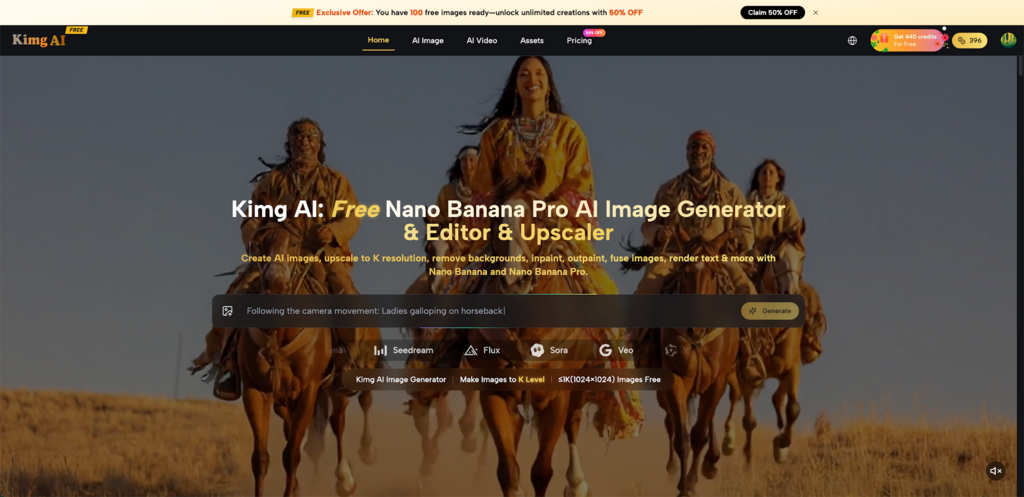
Kimg AI is a free AI image generation and editing tool that combines multiple industry-leading models in one place. It handles text-to-image generation, image-to-image transformation, style transfer, background removal, inpainting, outpainting, image upscaling, and video animation — all within a single workflow.
Understanding the model lineup helps freelancers match the right tool to the right job.
1. Nano Banana — Solid Foundation for Creative Work
The base Banana AI model handles text-to-image and image-to-image generation with hyper-realistic output. It's Google Gemini-powered, supports up to 4 reference images for style and character consistency, and comes with full commercial rights on all outputs.
2. Nano Banana 2 — More Control, Faster Iteration
Nano Banana 2 is the next step up. It generates up to 4 images per request and lets users choose directly between 1K, 2K, and 4K output resolutions. Advanced prompt comprehension means fewer missed generations and less time correcting.
Nano Banana Pro is the flagship model on Kimg AI, built for clients who need print-ready or ad-ready assets. It uses an advanced reasoning core to handle complex, multi-step creative prompts with precision.
One of the most underrated features of Kimg AI is how it handles reference material. Instead of describing every visual detail from scratch, users can upload up to 8 reference images to guide the generation.
Static visuals are useful. Motion content is where engagement really climbs — and Kimg AI connects both without requiring a separate video tool.
Veo 3, integrated directly into Kimg AI, turns any generated image into a short cinematic video with natively synchronized audio — including dialogue, sound effects, and ambient sound.
For freelancers producing social content, this is a meaningful efficiency gain. A single image asset can become a TikTok, an Instagram Reel, and a YouTube Short — all from one generation session.
Here's where Kimg AI actually moves the needle in real freelance scenarios:
1. Product Visualization Without a Photo Studio
Generate product mockups from reference photos, place them in any setting, and output 4K-quality assets for ad creatives — no lighting equipment, no studio booking.
2. Social Media Content at Volume
Transform a single reference image into dozens of style variations. Batch generation with Nano Banana 2 means a week's worth of content for a client can be prepared in an afternoon.
3. Brand Identity Work
Maintain consistent visual characters, color palettes, and art styles across an entire brand project using reference image uploads and style transfer. Nano Banana's character consistency feature keeps everything coherent.
4. Editorial and Campaign Imagery
Flux, another model available on Kimg AI, handles context-aware editing with object-level precision — modify one element of an image without touching the rest. Useful for campaign assets that need several variations of the same scene.
One of the honest concerns about AI-generated visuals is quality trade-offs. Kimg AI addresses this by offering model choice rather than forcing a single output standard.
The ability to choose the right tool for the right output — rather than compromising on one — is what separates Kimg AI from simpler generation tools.
Freelancers who scale do so by working smarter, not just faster. Kimg AI offers a practical, accessible way to multiply creative output without multiplying work hours. From quick concept batches with Nano Banana 2 to polished 4K campaign assets with Nano Banana Pro, and all the way through to video content via Veo 3, the toolkit is genuinely complete. The question isn't whether AI image generation belongs in a freelance workflow — it's how soon it becomes the new baseline. Ready to see what your creative output looks like when time stops being the limiting factor? Start with Kimg AI and find out.