Content creators: Custom songs from lyrics, no skills needed.
In 2026, relying on generic stock music is the fastest way to get scrolled past. Smart creators are skipping licensing headaches and instantly generating custom audio that perfectly fits their video’s vibe using Lyrics to Music AI. This technology allows you to transform text into professional-grade tracks in seconds, giving you a unique sonic identity without stepping foot in a studio.
Best Use Cases for Lyrics to Song AI
Why are top agencies and influencers switching to AI-generated music? It is not just a novelty; it is a strategic asset. Here is how different sectors of the creator economy are utilizing this tool to gain a competitive edge.
1. Social Media BGM (Background Music)
On platforms like TikTok, Instagram Reels, and YouTube Shorts, audio is the primary driver of engagement.
- Beating the Algorithm: Algorithms in 2026 prioritize original audio. When you create a unique song, you own the "Audio Source." If your track is catchy, other users will use it for their videos, creating a viral loop that links back to your original profile.
- Contextual Relevance: Stock music is vague. AI music is specific. If you are making a travel vlog about a rainy day in Tokyo, you don't just want "sad piano music." You can generate a "Lo-Fi hip hop track with rain sounds and lyrics about wandering Shinjuku," creating an atmosphere that stock libraries simply cannot match.
- Retention Hacks: The first 3 seconds are critical. By using AI to generate a lyrical hook that starts exactly when your video starts, you grab the viewer's attention aurally and visually simultaneously.
2. Brand Jingles and Sonic Branding
Sonic branding—the strategic use of sound to reinforce brand identity—used to be reserved for Fortune 500 companies.
- Affordable Consistency: Small businesses and drop-shippers can now generate consistent intro/outro music for their video ads. By using the same AI voice and melody style across all content, you build brand recognition.
- Lyrical CTAs: In video ads, you often have limited screen space for text. You can use AI to sing your Call to Action (e.g., "Click the link below for fifty percent off"). Studies show that information delivered melodically is retained significantly better than spoken information.
3. Podcast Intros and Segues
Podcasting is more crowded than ever. A custom theme song sets the tone immediately.
- Dynamic Segments: Instead of one static theme song, you can generate variations for different segments (e.g., a "News" segment vs. a "Listener Mail" segment) that share the same musical DNA but have different lyrics and tempos.
The Workflow of Lyrics to Music
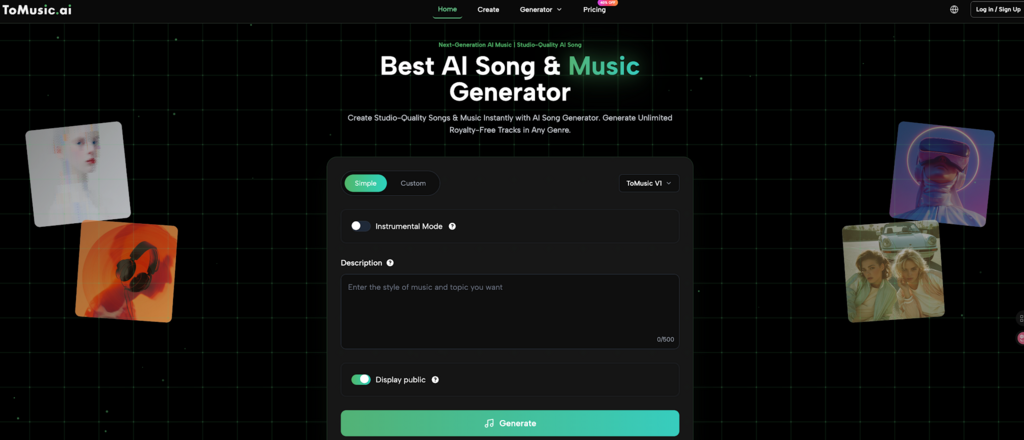
Generating music is no longer a complex studio process involving producers, vocalists, and engineers. It is a software workflow. Here is a step-by-step guide on how to go from a text idea to a downloadable WAV file using ToMusic Lyrics to Music.
Step 1: Input and Lyrical Structure
The quality of the output depends heavily on the input. You have two options:
- Bring Your Own Lyrics: If you are a songwriter or poet, paste your verses and chorus directly into the text field. Use structure tags like [Verse], [Chorus], and [Bridge] to help the AI understand where the energy should rise and fall.
- AI-Assisted Writing: If you are a marketer, you might only have a slogan. Use the built-in AI lyric writer to expand your slogan into a full song structure. For example, input "Buy our new spicy ramen," and the AI can expand that into a catchy pop punk jingle.
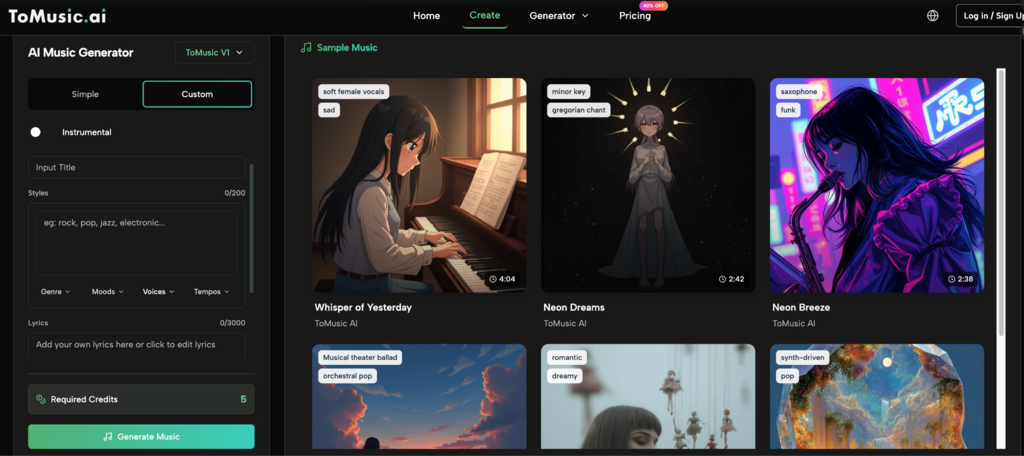
Step 2: Defining Style and Mood
This is where you act as the producer. Do not just select "Pop." Be specific to stand out.
- Genre Blending: The power of AI lies in its ability to combine unlikely genres. Try prompts like "Cyberpunk Jazz," "Acoustic EDM," or "Orchestral Trap."
- Emotional Mapping: Select a mood that contrasts or complements your video. If you are editing a high-energy fitness video, select "Aggressive" or "Motivational." If it's a sad storytelling video, choose "Melancholic" or "Ethereal."
Step 3: Generation and Iteration
Once you hit generate, the AI analyzes the sentiment of your text, syllable count, and desired genre to compose a melody and backing track.
- The "Seed" Concept: If the first result isn't perfect, don't worry. AI generation is probabilistic. You might generate three versions: one might have a great melody but the wrong voice; another might have a perfect beat. You can often "remix" or re-roll specific sections until the output matches your vision.
Step 4: Final Polish
Before downloading, listen to "artifacts" or unnatural phrasing. The best AI tools allow you to regenerate specific lines if the pronunciation is slightly off, ensuring the final vocal sounds human and professional.
Comparison: Free vs Paid Lyrics Generators
In the world of AI tools, "Free" often comes with hidden costs—usually in the form of legal risk or poor quality. Here is why serious creators upgrade to professional tools like ToMusic.ai.
Feature | Free / Generic Tools | Pro Tools (ToMusic.ai) |
Audio Fidelity | Low Bitrate: Often 128kbps or lower. Sounds muddy on good speakers. | High Fidelity: Crystal clear audio suitable for TV or high-end YouTube production. |
Vocal Quality | Robotic: Sounds distinctly like a text-to-speech bot; lacks emotion. | Human-Like: Includes breath, pitch modulation, and emotional dynamics. |
Copyright & Usage | Restricted: often for non-commercial use only. You don't own the track. | Commercial License: Clear rights to monetize your video on YouTube/TikTok. |
Duration Limit | Snippets: Usually limited to 15-30 seconds. | Full Songs: Generate tracks up to 3-4 minutes long. |
File Formats | MP3 Only: Highly compressed. | WAV + Stems: Professional uncompressed formats. |
The Hidden Cost of Free: If a video with a "free" AI song goes viral, the platform that generated it might claim ownership, leading to your video being demonetized. Paying for a pro subscription is essentially insurance for your revenue.
FAQs About Lyrics to Music
Can I get a copyright strike for using AI-generated music on YouTube?
If you use a professional platform like ToMusic.ai and have the appropriate license/subscription, you generally will not get a strike. The AI generates unique compositions, meaning the "Content ID" system on YouTube won't flag it as matching an existing copyrighted song.
Can I upload these songs to Spotify or Apple Music?
Yes, many users do. Since you are the creator of the lyrics and the prompt, and the AI generates a unique file, you can often distribute these tracks as your own music. Always check the specific Terms of Service of the plan you are on.
Does AI work with languages other than English?
Most advanced lyrics-to-audio engines now support multi-language generation, including Spanish, French, Mandarin, and Japanese. This is excellent for creating localized ads for different global markets.
I don't know anything about music keys or BPM. Does that matter?
No. The AI handles the theory. However, if you do know that your video is cut to a fast pace, you can specify "Fast Tempo" or "140 BPM" in your prompt to ensure the music matches the speed of your cuts.
Final Thoughts
The ability to turn text into sound is one of the most powerful advancements for content creators in the last decade. It democratizes music production, allowing a solo YouTuber to have the sonic branding of a major media company.
By mastering this workflow now, you aren't just saving money on licensing fees; you are building a unique creative identity that cannot be copied.Ready to create your signature sound? Generate your first song on ToMusic Now!