The first time I needed online data recovery help, it felt ordinary, which is what made it dangerous. A portable drive stopped mounting after an update, and the folders that held weeks of work turned into a blank directory with an error message. I did what most people do under pressure: I restarted, swapped cables, tried another computer, then downloaded a couple of “recovery” tools that promised a one-click fix. That impulse nearly made the outcome worse, because repeated scans, installs, and writes can overwrite recoverable fragments on the very device you are trying to save.
Since then, I treat data recovery as a controlled operation. The question is not only where to find an expert online, but how to hire one without losing control of your device, your privacy, or your best chance of recovery. If you approach it like an investigation, you reduce guesswork, you avoid irreversible steps, and you can measure whether the person you hire is working safely.
When I need a specialist quickly, I start with platforms where I can validate experience, compare scope, and keep the transaction structured. I do not begin with random software downloads or anonymous forum advice, because both can encourage trial-and-error on the original disk.
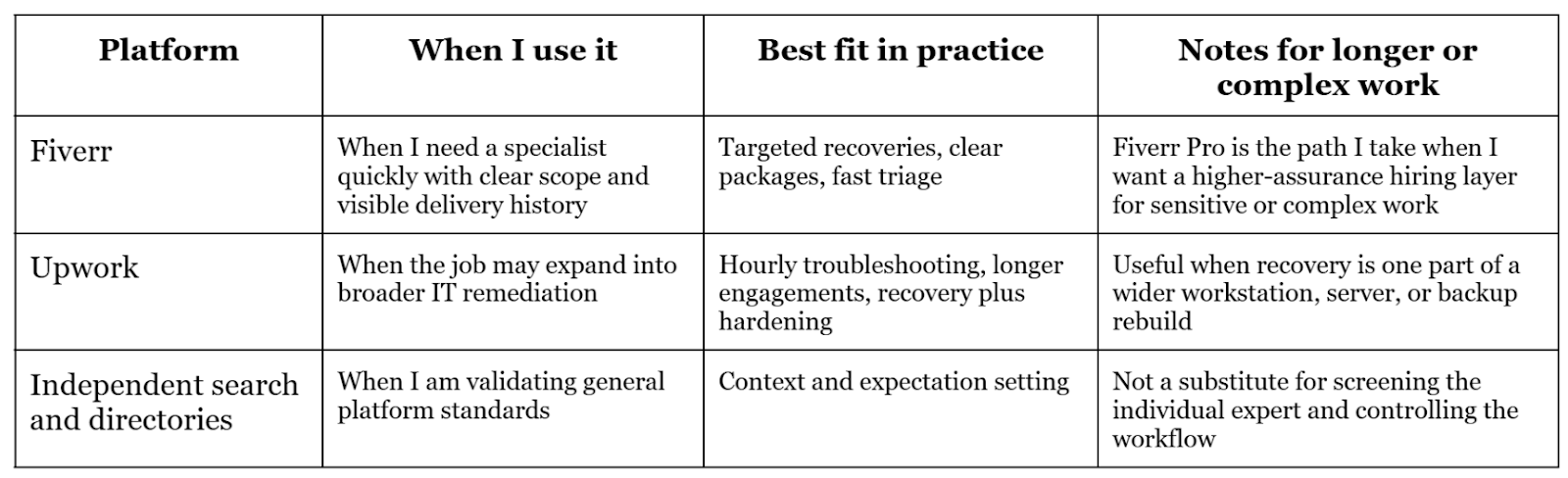
I usually start with Fiverr data recovery experts because I can see service scope, delivery history, and starting prices without negotiating from scratch. I also like that many sellers describe what they will do first, which helps me filter out people who want to “scan everything” before stabilising the situation.
For a second option, I consider Upwork data recovery specialists when the work looks broader than recovery alone, such as recovering data and then rebuilding a workstation, reviewing backup practices, or diagnosing underlying storage health issues. That longer engagement model can be useful when recovery is only one step inside a wider remediation effort. To keep my expectations grounded, I also check reputable industry guidance for general platform signals that reduce risk, such as transparency, proof of work, and clear service positioning.
The hiring mistake that causes most recovery failures
The most common failure mode I see is not technical; it is behavioural. People keep trying one more thing on the same device. Every extra boot, every new install, every repeated scan increases the odds that something writes to the disk and overwrites what you are trying to recover.
When I am hiring online, I want a professional who is calm about stopping activity. If someone pushes you to run multiple tools quickly “to see what happens,” they are treating your device like a test bench. A careful specialist treats your device like evidence. They try to preserve state, minimise writes, and choose the least invasive step that can still generate useful diagnostics.
I screen for process and restraint, not confidence. Competent professionals tend to ask better questions than clients do, and they ask them early.
I expect the expert to ask what changed before the failure, what device type it is, whether it is SSD or HDD, whether encryption is enabled, whether the drive makes unusual sounds, and whether the operating system can detect the disk at all. I also expect them to ask whether I already ran recovery tools, because prior tool usage changes the risk profile.
I also pay attention to how they describe outcomes. If a person promises “guaranteed recovery” without seeing the device state, logs, or a disk image, I treat that as a reliability red flag. Real recovery work is probabilistic. A professional should be comfortable saying “it depends” and then listing the variables that determine success.
Finally, I look for a non-destructive first step. The best people talk about assessment, stabilising the device, and deciding whether imaging or cloning is needed before deep analysis. Even if the case is simple, they should explain why their approach is safe for that specific scenario.
Remote recovery can be safe, but only if you control the workflow. I insist on a process that makes irreversible actions rare and deliberate.
First, I stop using the affected device. If it is an external drive, I disconnect it and avoid repeated reconnections. If it is an internal drive, I avoid installing new software on it and do not move files around “to test it.” If I must keep working, I switch to another disk or another machine.
Second, I push for triage to classify the problem as likely logical or likely physical. Logical problems include deletion, formatting, corrupted partitions, or file system errors where the disk is still detected. Physical problems include repeated disconnects, clicking noises, or a disk that is not consistently recognised. If the case looks physical, I slow down even more, because repeated power cycles and scans can reduce recoverability.
Third, I prefer a clone-first posture for anything that looks unstable. Imaging allows analysis to happen on a copy rather than the original. That single decision reduces risk more than almost any tool choice, because you can try multiple strategies on the image without grinding the original device through repeated reads.
Fourth, if remote access is required, I keep the session supervised. I want to see what tools are installed, where they are installed, and what they will do. I do not allow installs onto the affected disk. I also ask the expert to explain what they are doing as they do it, because clear explanation correlates strongly with careful work.
When the recovery is business-critical or sensitive, I try to reduce uncertainty in the hiring layer. Fiverr Pro is relevant here because it is designed around higher-assurance engagements and clearer client safeguards. Fiverr Pro provides access to a vetted Pro talent pool, which can reduce the noise and uncertainty you often face when you need a specialist quickly.Fiverr Pro includes a money-back guarantee for eligible orders, which adds a practical layer of protection if the delivered work does not align with the agreed scope. Fiverr Pro offers Pro expert support for matching and shortlisting, which can help when you do not know whether your case needs a file system specialist, a forensics-oriented practitioner, or a broader systems engineer.
I treat these as risk controls rather than promises of recovery. They do not change the physics of damaged storage, but they can improve the reliability of hiring, scoping, and delivery when stakes are high.
Most clients describe symptoms, not causes. They say my drive is not showing, my folders disappeared, or my laptop says corrupted. That is understandable, but it often leads to vague job posts and poor matching.
Fiverr’s AI direction can help narrow that gap when used sensibly. Fiverr Neo is positioned as an AI-assisted matching experience to connect clients with relevant freelancers more efficiently, which is useful when you are not sure what specialist profile you need. The AI Brief Generator is also useful in practice because it can prompt you to include details that affect recovery strategy, such as device type, encryption status, what changed before failure, and whether any tools have already been run. AI project management features are helpful when the job involves multiple steps or handoffs, because they can improve clarity around requirements, delivery checkpoints, and communication, which is often where remote technical work breaks down.
Online pricing varies widely because data recovery covers everything from restoring recently deleted files to reconstructing damaged metadata or extracting from corrupted containers. I use marketplace listings as a reality check, then I anchor cost expectations to complexity and effort.
For basic scenarios where the disk is healthy and the ask is narrow, pricing can start low. For broader or more complex logical recovery, costs rise as scan time increases, verification becomes stricter, and secure handover becomes more involved. When imaging is required, that adds time and storage overhead. When encryption, virtual disks, or enterprise storage is involved, complexity increases again because the recovery path is more constrained and the validation burden is higher.
The way I keep pricing fair is by insisting on scope clarity. I want to know what diagnostic includes, what a recovery attempt includes, what counts as success, and what the deliverables look like. If the provider cannot define deliverables, the price does not matter, because you cannot measure whether the work was done safely or well.
I treat access as part of the recovery plan, not an administrative detail. A professional should be comfortable with restrictions, because restrictions protect both sides.
Before I allow remote access, I ask what tools they will use and where they will be installed. I will not install recovery tools onto the affected drive. I also ask what they will need to view and what they will not need to view, because most recovery work can be done by analysing file system structures rather than browsing personal documents.
If an image of the drive is required, I confirm how it will be stored, how long it will be retained, and how it will be deleted after delivery. I also prefer supervised sessions for remote access, because it keeps the process transparent and reduces misunderstandings about what changed on the device.
Before any recovery work starts, I prefer to align expectations with a simple, neutral explainer that shows why stopping drive use and avoiding repeated scans matters. If you want a quick overview of how data recovery typically works, this YouTube video is a helpful primer: How Data Recovery Works (its usually not that complicated. It provides a general understanding of common recovery scenarios and why the earliest steps are often about preventing further writes rather than trying more tools.
When I contact an online expert, I keep the message short and factual so I get a meaningful response quickly. I describe the device type, the symptom, what changed before failure, and what I have already tried. I ask whether the case sounds logical or physical, what their first non-destructive step would be, and whether they recommend imaging before analysis. I also ask how they will avoid writing to the affected disk, how recovered files will be returned, and what their deletion and retention approach is after delivery.
If you follow the same approach, you can hire through a structured platform, keep the first step non-destructive, and run the session in a way that preserves the original device state while you decide whether to proceed with imaging, deeper analysis, or a different recovery path based on what the diagnostics show.