Windows 7, Windows 10, and Windows 11 System
In industrial environments, touch panel PCs are widely used for their high integration and user-friendly operation. With continuous technological advancement, operating systems (OS) have also evolved steadily. Windows 7, Windows 10, and the latest Windows 11 are three common OS options on the market, each with distinct characteristics suited to different requirements and scenarios.
As a classic desktop operating system, Windows 7 has gained wide popularity for its clean, intuitive user interface and exceptional stability. It is an ideal choice for legacy equipment or applications with low system resource demands. Its low CPU utilization and strong compatibility allow smooth performance on older hardware. However, Microsoft ended technical support for Windows 7 in 2020, meaning no official security updates or service patches are available, introducing potential security risks. Therefore, using Windows 7 in security-critical industrial environments requires extra protective measures and may depend on third-party security solutions.
Windows 10 represents a major milestone for Microsoft, retaining the strengths of Windows 7 while introducing numerous new features and technical improvements, such as the Cortana voice assistant, Microsoft Edge browser, and enhanced enterprise-grade security and management capabilities. Windows 10 maintains system modernization through regular feature updates and improves compatibility with the latest software and hardware. Furthermore, the Pro edition of Windows 10 offers advanced networking options, virtualization technology, and data protection features, making it well-suited for complex industrial applications. Nevertheless, its automatic update mechanism can occasionally disrupt production workflows, so enterprises typically adopt delayed updates or customized update policies to minimize impact.
Windows 11 delivers a redesigned user experience, including a centered Start Menu, rounded window borders, and improved touch and stylus support, all intended to boost productivity and creativity. More importantly, Windows 11 raises security standards, such as the mandatory TPM 2.0 module requirement, which is critical for safeguarding sensitive information. However, Windows 11 has higher hardware requirements and is only compatible with newer processors, limiting its use on some older devices. As a relatively new system, it may face certain compatibility issues in the initial stage, though these problems are expected to be resolved gradually over time.
When selecting an operating system for industrial touch panel PCs, it is essential to weigh the features of each version. Windows 7 can still serve as a transitional solution for aging devices that do not require frequent updates, but users must assume the associated security risks. Windows 10 is currently the most balanced option, combining mature technology and broad support to meet most industrial needs. For users seeking cutting-edge technology and advanced security features, Windows 11 is undoubtedly the best choice as long as the hardware meets its requirements. Ultimately, the decision should be based on specific business needs, hardware conditions, and long-term maintenance plans.
Is Windows Better Than Android for Outdoor Rugged Tablets?
When choosing a rugged tablet for outdoor use, the operating system is a key decision factor. Windows and Android each have advantages, targeting different user groups and application scenarios. This article discusses the characteristics of both systems in outdoor environments and analyzes whether Windows performs better than Android.
I. Professional Software Compatibility
For users running specialized industrial software, Windows generally offers broader compatibility. In fields such as geological exploration, architectural design, and mechanical manufacturing, many professional tools—including AutoCAD and SolidWorks—are developed for the Windows platform. These programs often demand high computing resources, and Windows rugged tablets can deliver sufficient processing power to handle complex tasks.
II. Multitasking Capability
Windows supports multi-window parallel operation, enabling users to run multiple applications simultaneously, such as monitoring SCADA data, editing Excel reports, and joining video conferences at the same time. While Android also supports multitasking, its mobile-first design philosophy may result in a less smooth multitasking experience compared to Windows.
III. Expansion Interfaces and Peripheral Connectivity
Windows rugged tablets are typically equipped with various standard interfaces, including USB 3.0, HDMI, and RJ45, allowing direct connection to industrial peripherals like PLC controllers and spectrometers. On Android devices, the lower standardization of interfaces often requires additional adapters for equivalent functionality.
IV. Enterprise-Grade Security and Management
For enterprises prioritizing data security, the Windows Enterprise edition provides features such as BitLocker encryption, Group Policy management, and domain integration, helping protect sensitive information. Although Android offers MDM solutions, Windows maintains an advantage in access control and deep integration with existing IT infrastructure.
V. User Experience and Portability
Android stands out for its intuitive, easy-to-use interface, making it particularly suitable for scenarios that do not require complex software support, such as warehouse management and field services. Additionally, Android devices are often lighter and may offer longer battery life than Windows devices with comparable specifications.
VI. Cost Considerations
Generally, Android devices are priced lower than Windows devices at the same configuration level, an important factor for users with limited budgets who still require basic rugged performance.
Windows on outdoor rugged tablets delivers strong professional software compatibility, reliable multitasking, and extensive expansion options, especially for industrial applications requiring high-performance computing and advanced enterprise security. Meanwhile, Android provides a viable alternative with its user-friendly interface, solid portability, and cost advantages. Whether one system is “better” largely depends on specific application needs and personal preferences. Windows may be the superior choice for work environments demanding heavy-duty professional software and high-level security, while Android is often more suitable for flexible, convenient, and straightforward solutions.
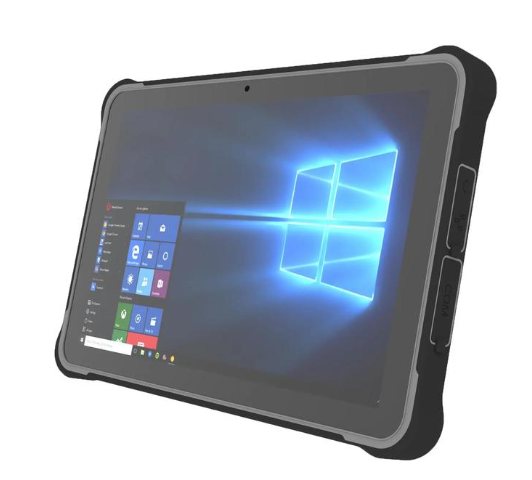
What Tasks Can Windows 10 Rugged Tablets Handle?
Driven by the Industry 4.0 era, demand for equipment that operates reliably in extreme environments is growing rapidly. Rugged tablets running Windows 10 combine a durable, rugged design with powerful functional configurations, showing extensive application potential across multiple sectors.
I. Efficient Assistant in Manufacturing
Manufacturing workshop environments are often harsh, featuring dust, oil, and occasional liquid splashes. Windows 10 rugged tablets—with waterproof, dustproof, and drop-resistant properties—are ideal companions on production lines. They can monitor production equipment status in real time, collect and analyze operational efficiency data via dedicated software, and identify potential issues promptly. Furthermore, these tablets serve as mobile workstations for engineers to perform on-site design revisions or troubleshooting, ensuring continuous and efficient production workflows.
II. Core Component in Logistics and Warehouse Management
In the logistics industry, fast cargo turnover relies on accurate information management and efficient scheduling. Rugged tablets withstand challenges common in warehouses, such as vibration from forklift operations and variable weather during outdoor tasks. Integrated barcode or QR code scanning enables full digital tracking of goods from receipt to dispatch, reducing human error and improving inventory accuracy. Through wireless network connections, staff can update cargo status instantly, ensuring real-time synchronization of supply chain information.
III. Support Platform for Field Services and Maintenance
Field operations—from construction sites to wilderness exploration—feature complex and variable conditions. The compatibility and rich application ecosystem of Windows 10 provide strong support in these scenarios. On construction sites, rugged tablets can display blueprints, record progress, and coordinate team communication. For power facility maintenance, they read sensor data, perform remote diagnostics, and guide technicians through complex repairs. Such devices improve efficiency while lowering the risk of equipment damage from environmental factors.In addition, rugged tablets can support the installation of dedicated industrial software such as color detectors, which enable real-time color measurement using the tablet’s built-in camera. Environmental light interference can be compensated for by using a white sheet as a reference, greatly improving measurement accuracy.
The solution supports a wide range of color spaces, including RGB, HEX, HSL, CMYK, CIELAB, and OKLAB, and can identify the closest matching standard colors from RAL, Munsell, and HTML color systems. It is also capable of measuring Light Reflectance Values (LRV) and provides color names in more than 40 languages.
IV. Reliable Partner in Public Safety
In emergency rescue, law enforcement, and related fields, time is critical, and delays can lead to irreversible consequences. Windows 10 rugged tablets deliver high performance and play vital roles in emergency command, criminal investigation, and other public safety operations. They help police access suspect information quickly, assist firefighters in planning optimal routes, and allow medical personnel to assess patient conditions en route. Their rugged chassis ensures stable operation even in intense operations, contributing to the protection of lives and property.
V. Innovative Tool for Education and Scientific Research
Although traditionally linked to industrial scenarios, rugged tablets have been increasingly adopted in education and scientific research. Teachers use them for outdoor instruction, while students leverage their strong computing and multimedia capabilities to complete lab reports and other assignments. During fieldwork, scientists store large datasets and sync them to the cloud for further analysis in laboratories.
With outstanding technical features and adaptability to harsh environments, Windows 10 rugged tablets have become indispensable tools across numerous industries. From busy factory floors to remote outdoor expeditions, they empower industries to advance toward a more intelligent future.
RGDCOMPT windows Industrial Touch Panel PCs
gdcompt.com offers a full lineup of Windows-powered industrial touch panel PCs engineered for harsh operating environments. Available in multiple standard sizes, these panel PCs support Windows 10 Pro and Windows 11 Pro, delivering broad compatibility with industrial software, PLC systems, and enterprise management platforms. Adopting a fanless design and rugged metal chassis, they feature front IP65 dustproof and waterproof protection, wide-temperature operation, and strong resistance to shock, vibration, and electromagnetic interference. Equipped with reliable capacitive or resistive touchscreens, they enable responsive control even with gloved hands. Rich I/O interfaces including USB, RJ45, and serial ports ensure seamless integration with sensors and industrial equipment. Supporting embedded, wall-mounted and VESA installations, they are widely applied in industrial automation, smart manufacturing, logistics, and on-site HMI control scenarios.