
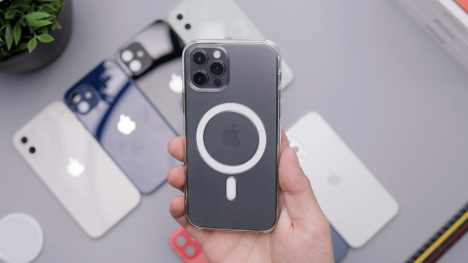
Wireless charging has come a long way from slow pads and alignment struggles. With MagSafe, Apple made charging feel snappy and secure and built into the design language of the phone. The magnets, the click, the accessories. It works, and people like it. But that doesn’t mean every case plays nice with it.
A good phone case should protect without getting in the way of daily use. But with MagSafe, that daily use includes how quickly the phone charges, how tightly accessories stick, and how well the magnets align. Some cases claim MagSafe compatibility without delivering on any of it. That gap leads to slow charging, weak magnet grip, or overheating that throttles performance.
Many third-party brands list MagSafe support in the description, but compatibility is not the same as performance. A case can technically charge wirelessly and still slow things down. Some use thick materials that push the phone further from the coil. Others skip the internal magnet ring, so the phone doesn’t lock into place properly.
Even minor spacing changes weaken the magnetic hold. That leads to car mounts dropping off during a turn or wallets sliding out of alignment in a pocket. Worse, poor alignment causes the phone to heat up as it struggles to find the coil sweet spot.
Charging speeds drop, battery health gets hit, and the convenience of wireless starts to feel more like a compromise.
MagSafe isn’t just about magnets. It’s a system. It uses perfectly aligned coils, magnetic positioning, and firmware that adjusts current based on feedback. If a case adds bulk or disrupts the magnetic alignment, the system defaults to slower charging. In some cases, it gets turned off entirely.
Apple-certified cases usually include a built-in magnetic ring. They are made of rare-earth materials that mimic the alignment built into the phone. These rings ensure accessories snap in place and that the phone recognizes the setup as safe for higher wattage charging.
Most transparent and flexible cases don’t include that ring. Some rely on the base layer of silicone or TPU to be thin enough for a weak connection. That’s why the upgrade process matters.
Before buying a new case, it's worth checking a few key features that make a difference in how well MagSafe and charging perform:
These design elements help charging stay consistent. They also make sure the phone feels like it did out of the box—fast, tight, and functional.
One of the biggest myths in wireless charging is that thicker cases always block current. While that can be true, it’s more about material density than thickness. Some cases are relatively thick but use materials that allow electromagnetic transfer efficiently.
Other cases are thin but use layered plastic or poor-quality rubber that interferes with the process. When that happens, the phone heats up, and the charger reduces speed to avoid damage.
A better-built case manages distance from the coil and lets heat escape. That balance keeps MagSafe working, even during longer sessions.
The right MagSafe-compatible case shouldn’t limit the use of accessories. In fact, some of the newer iPhone 16 Pro cases enhance it. They’re made with stronger magnets than Apple’s base offering, which improves grip on wallets, kickstands, and car mounts.
For those using MagSafe stands or battery packs daily, the fit of the case makes or breaks the experience. A well-aligned case ensures that power transfer happens without micro-adjustments or detaching accessories just to get a proper charge.
More users are building out full ecosystems around MagSafe now. Some of these are mounts on desks, chargers by beds, and wallets in pockets. Choosing a case that keeps that ecosystem running smoothly makes the whole setup more seamless.
Too many cases ask users to pick between form and function. It doesn’t have to be that way. A MagSafe-friendly case should protect the phone and charge without delay. The best ones don’t even call attention to their compatibility. They just work.
Wireless isn’t the future anymore. It’s the baseline. So, when upgrading gear, don’t settle for vague claims. A proper MagSafe-compatible case should feel like an extension of the phone, not a barrier to what it can do.











