In 2024, Wix alone reported over 260 million users worldwide. That number is… a lot. Like, “everyone’s cousin has a Wix site” a lot. 😅
For SMEs, free website builders (including Wix, Squarespace, and WordPress.com) usually deliver day-one stability—hosting, updates, templates, and security handled for you—but they reduce flexibility as you grow (I recently read an in-depth guide to SEO-friendly AI website builders and the trade-offs to expect that mirrors this).
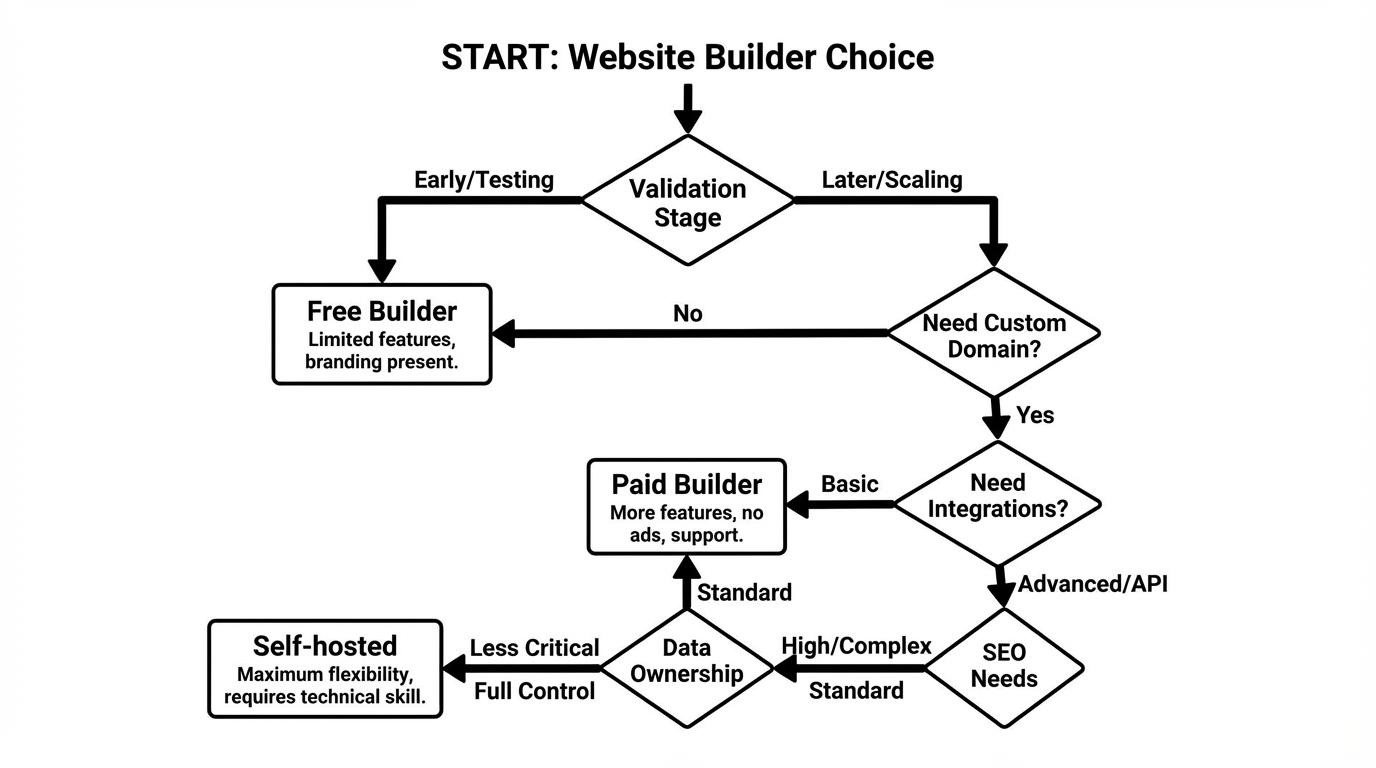
Image 1 (overview): A simple decision flow for SMEs choosing free builders vs paid vs self-hosted.
For SMEs, builder “stability” means the platform owns hosting, patches, templates, SSL, and most security defaults, but you accept platform rules that limit customization and data control.
Okay, so when people say “stable,” they often mean “I didn’t touch anything and it didn’t break.” That’s real value.
What you get on day one: hosting that doesn’t ask you to pick a Linux distro, SSL that just… shows up, and an editor that won’t let you delete something critical by accident. It’s like those kid-safe scissors. They cut paper. They don’t cut your finger.
But yeah, kid-safe scissors also won’t cut thick cardboard.
What you give up (quietly): the right to do “odd” things. Like installing a niche analytics script your franchise partner requires. Or adding a custom checkout flow. Or moving your site elsewhere without it turning into a weekend-long archaeology dig.
And I’m gonna be mom-naggy for a second: SMEs don’t fail because the homepage background wasn’t trendy. They fail because leads got lost, calls didn’t get answered, tracking didn’t work, and nobody noticed for weeks. Brutal.
US-local reality check: if you’re collecting leads, you’re probably dealing with privacy expectations even if you’re not “big tech.” California’s CPRA vibe has basically infected everyone’s legal anxiety, and if you run ads you’ll bump into consent banners and tracking settings sooner than you think. A free builder that won’t let you implement the cookie/consent tooling you need can become a “why is our retargeting dead?” mystery.
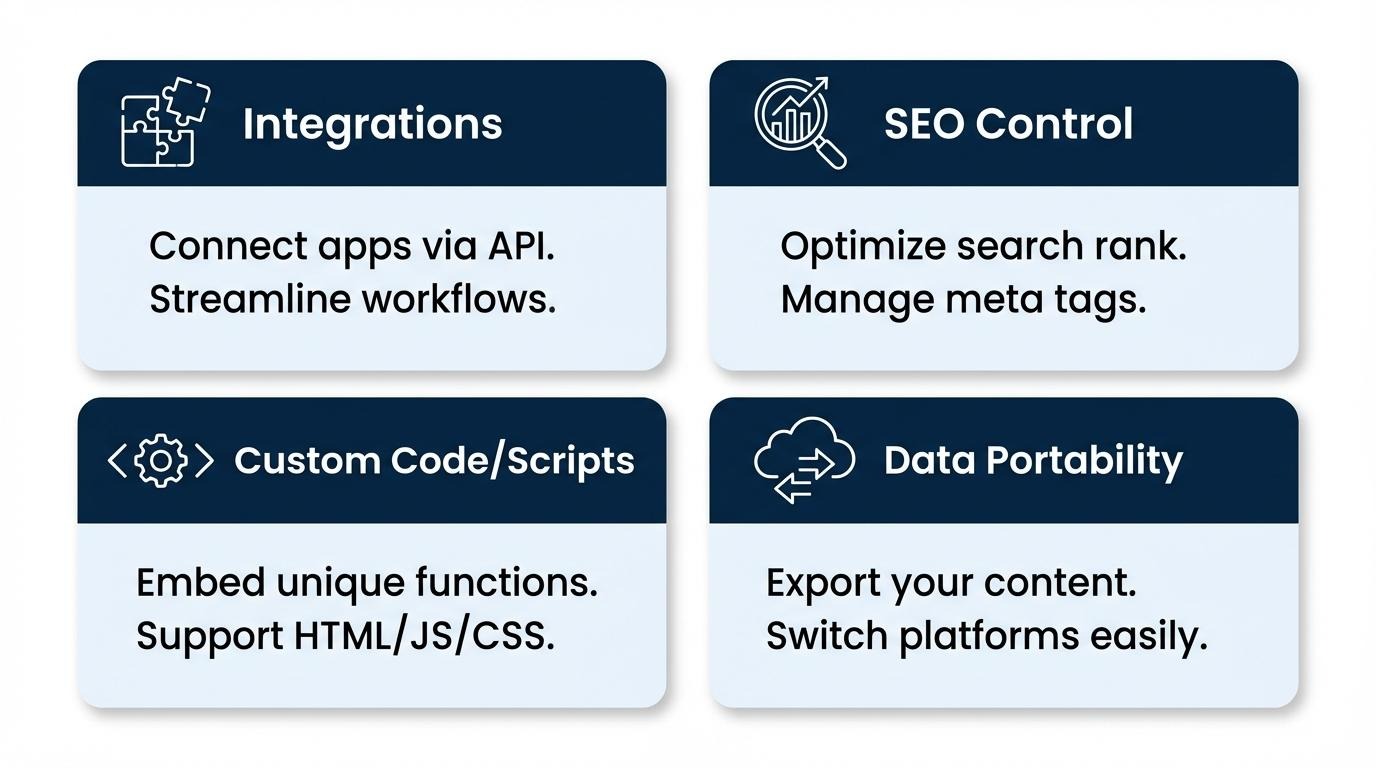
For SMEs, flexibility matters most in integrations (CRM, accounting, bookings), SEO controls, custom scripts, and ownership of analytics and customer data—not in how many templates exist.
I’ve watched teams obsess over fonts. Meanwhile, the owner is texting screenshots of DMs to the bookkeeper because nothing connects. That’s the real pain. 😬
Flexibility shows up when you need to connect:
Random thought: the moment you hear yourself say “We can just manually do it,” you are about to donate your evenings to the website gods. That’s not “free.” That’s your life.
SEO is the sneaky one. Most free plans can rank for your brand name and maybe a couple local terms, if you’re lucky and consistent. But if you need structured data, advanced redirects, better control of indexation, or clean URL structures, the platform boundaries start to show.
And no, I’m not saying you need to be an SEO wizard. I’m saying you need to avoid building your storefront in a place where you can’t move the shelves later.
Image 2 (core breakdown): “Flexibility” broken into 4 boxes SMEs actually feel day-to-day.
Free builder limitations usually appear as ads/subdomains, restricted SEO settings, limited integrations, capped storage/bandwidth, and weak export/migration options.
Let me be annoyingly specific: a free plan that forces a subdomain (like yourbiz.builder.com) can reduce trust for certain industries. People hesitate. They don’t always tell you they hesitated. They just… bounce.
Also ads. If your site shows someone else’s ads, that’s like hosting a dinner party and letting a stranger stand in your kitchen yelling coupons. 😭
Common “month 3” pain points:
Speaking of exports—this is where people get emotional. Because it’s not just “moving a site.” It’s moving your history: blog posts, SEO equity, product pages, forms, automations. That’s… a lot of little wires.
Blunt rule: If your business depends on the website to make money, you need to know how you’d leave the platform before you move in.
A practical way to choose between free builders and paid options is to compare the weekly time spent on workarounds versus the monthly cash cost of upgrading, using your team’s hourly value as the conversion rate.
Okay. Let’s do the part nobody wants to do. The math. 🧮
Pick one number: what is one hour of your time worth? Not your employee’s wage—your “if I spend an hour on this, what revenue work did I not do?” number.
For many owners I’ve met, that number is somewhere like $50–$200/hour. Sometimes more. Sometimes they lowball it because they’re tired. I get it.
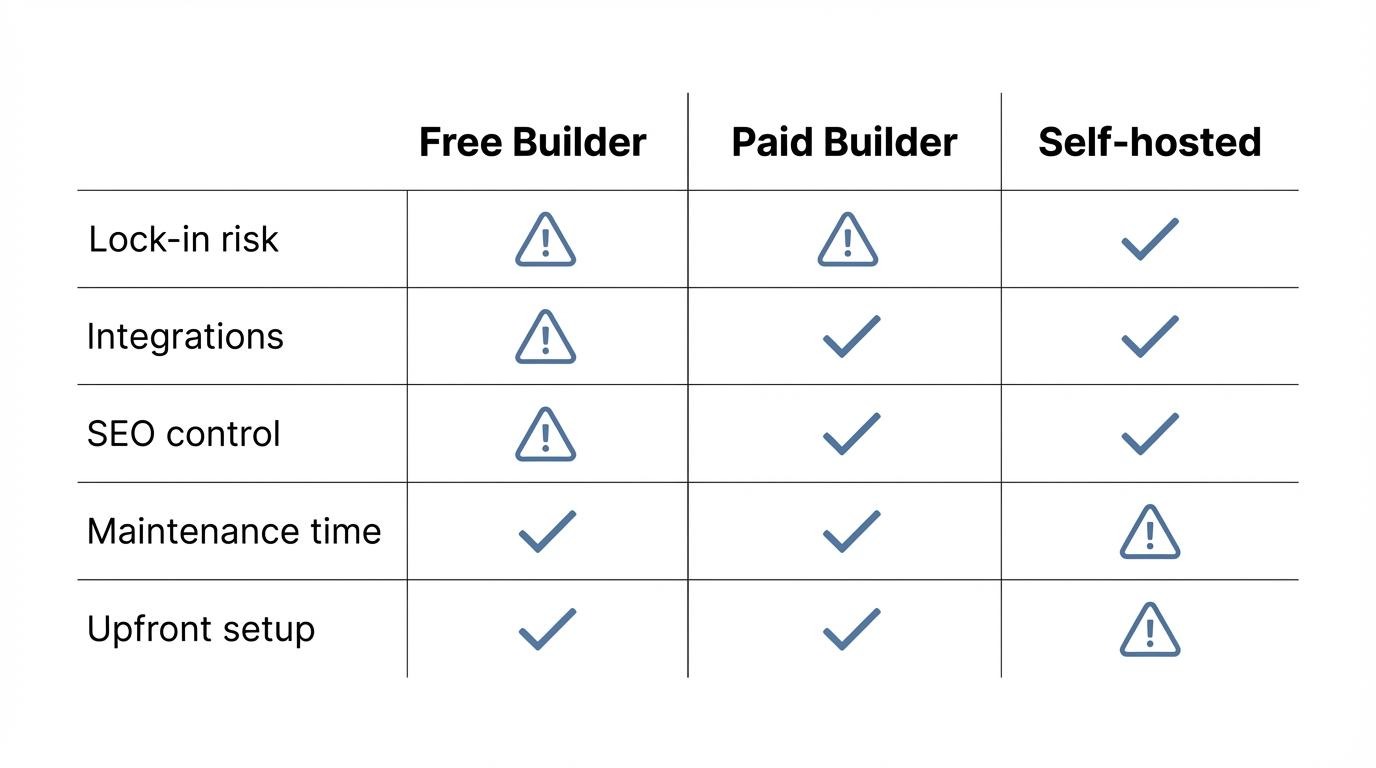
How to use this matrix (no fancy spreadsheet needed):
And yeah, sometimes the answer is “stay free.” If you’re validating a new service and you don’t even know if people will buy, paying for a whole setup can be like buying fancy storage boxes before you know you’re moving.
But if you’re already getting leads? Already running Google Ads? Already paying for inventory? Please don’t pretend $25/month is the scary part while you burn five hours on a Saturday moving images around because the builder won’t do the one thing you need.
Free website builders can take an SME through idea validation and basic lead capture, but they usually fall short once you need a custom domain, advanced tracking, scalable integrations, or a clean migration path.
If you’re in the “I just need a presence” phase, free can be fine. It’s a tent. It keeps the rain off.
But if you’re building a shop you plan to run for years, a tent starts to feel… thin. Especially when the wind picks up. And growth is wind. Always.
Ending resource (pure share): Search this exact phrase: “Wix export site to WordPress limitations”. Don’t click the first shiny ad result—look for the grumpy forum threads and migration guides. Those people are not trying to sell you anything. They’re trying to survive. 😅