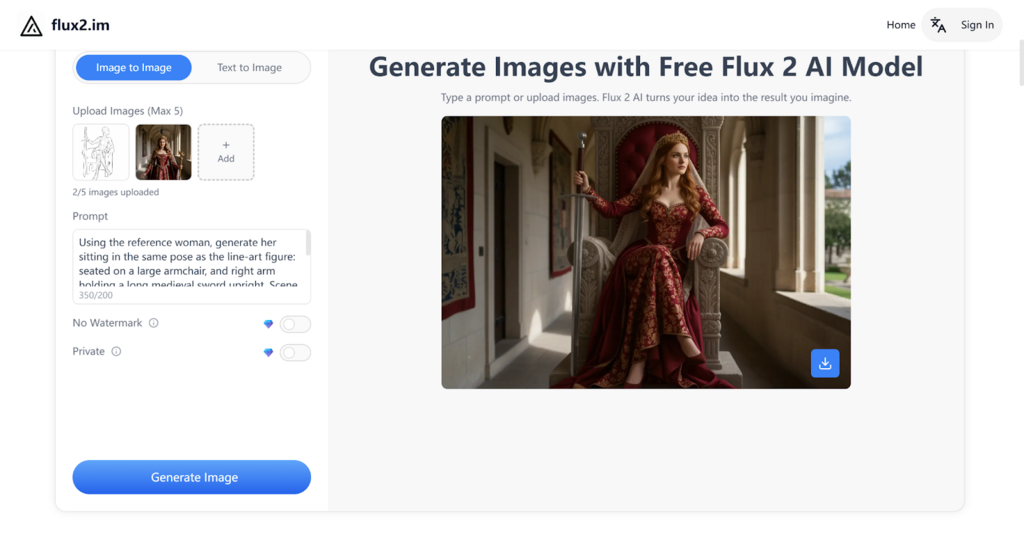
With the increasing demand for high-quality digital content across various industries, creative professionals are turning to advanced tools to streamline their workflow. AI image generators, like Flux 2, have emerged as essential solutions, offering speed and precision in producing realistic, high-resolution visuals. Whether it's for marketing campaigns, product design, or digital art, Flux 2 provides a versatile platform to meet these demands. Available through Flux2.im, this AI tool offers free Flux 2, such as Flux 2 Pro, Flux 2 Flex, and Flux 2 Dev, each designed to cater to different creative needs and levels of control. By understanding the unique strengths of each model, users can easily select the right solution to optimize their image generation process.
Flux 2 is an AI image generator developed by Black Forest Labs, designed to streamline the creation of high-quality, customizable visuals for a wide range of industries. With its advanced capabilities, Flux 2 offers highly detailed and realistic image generation, making it an essential tool for professionals in design, marketing, product visualization, and digital content creation. The AI image generator features multiple models to cater to different needs, including Flux 2 Pro for high-end image quality and speed, Flux 2 Flex for flexible control over rendering and layout, and Flux 2 Dev for open-weight access that enables developers to customize the AI model for specific projects. Additionally, the upcoming Flux 2 Klein, an open-source model under the Apache 2.0 license, will provide even more flexibility for developers seeking to integrate AI image generation into their own applications.
One of the standout features of Flux 2 is its ability to generate highly detailed and realistic images with a maximum resolution of up to 4MP. Whether you are working on product renderings, marketing visuals, or digital artwork, Flux 2 ensures that every image is crisp, sharp, and ideal for high-end applications. This high resolution is perfect for industries that demand precision, ensuring that no detail is lost, even in the most complex designs.
With Flux 2, users can upload up to 10 reference images simultaneously, enabling the AI to maintain consistent lighting, composition, and style across multiple assets. This multi-reference capability ensures that projects requiring multiple images—such as product lines or character sets—remain visually cohesive. Whether you are working on a brand campaign or creating a series of design assets, this feature saves time and guarantees uniformity across various visuals.
Flux 2 brings real-world knowledge into its AI model, enabling it to replicate natural lighting, shadows, and spatial relationships. The AI's ability to simulate these physical properties results in highly realistic and coherent scenes. Whether creating product visuals or digital environments, Flux 2 ensures that the lighting, space, and materials behave in a way that feels authentic and true to life. This feature is particularly useful for industries like architecture, advertising, and game design, where accurate spatial representation is essential.
Not only does Flux 2 generate images, but it also excels at rendering complex text layouts and infographics. Its advanced text rendering capabilities allow designers to integrate detailed text seamlessly into their visual compositions. From creating compelling UI models to designing engaging presentations, Flux 2 ensures that text is rendered clearly and precisely, making it an ideal tool for graphic designers and UI/UX professionals who need both functional and visually appealing content.
FLUX.2 Pro is designed for professionals who need the highest quality and fastest output. This version is optimized for production environments, delivering photorealistic results with speed and precision. Flux 2 Pro excels in maintaining consistency across multiple assets, ensuring that visuals, such as marketing campaigns and commercial visuals, are both accurate and high-quality. The model's quick generation and strong prompt accuracy make it ideal for businesses requiring efficient, commercial-grade image creation.
For users who require fine control over text clarity and layout accuracy, Flux 2 Flex offers the flexibility needed. This model allows users to adjust rendering steps and guidance settings to control the precision of text, fine details, and overall layout. Whether you're working on UI mockups, infographics, or more structured prompt workflows, Flux 2 Flex ensures your content is produced with maximum accuracy. This model is perfect for designers and content creators working on highly detailed, text-heavy projects where precision is paramount.
For developers looking to run Flux 2 AI locally or through platforms like FAL, Flux 2 Dev provides open-weight access. This model allows full customization, enabling developers to integrate the AI capabilities into their own applications or run them directly on personal hardware. It supports both text-to-image generation and multi-reference editing within a single checkpoint, offering flexibility for building unique workflows or creating custom visual content. Flux 2 Dev is the ideal choice for those who need full control over the deployment and functionality of the Flux 2 AI model.
Flux 2 is designed to be user-friendly, making it easy for anyone, from designers to developers, to generate high-quality images. Follow these three simple steps to start creating visuals with Flux 2 AI.
Begin by typing a detailed description of the image you want to create. Include important aspects such as the subject, lighting, mood, and style. The more specific your prompt, the more accurately Flux 2 can generate the desired result. Flux 2 AI uses advanced semantic understanding to process your instructions and deliver an image that aligns with your vision.
For those working on specific projects, you can upload reference images to provide additional context. This feature is particularly useful when working with multiple assets, as Flux 2 allows you to reference up to 10 images simultaneously. This helps ensure that lighting, composition, and style remain consistent across all generated visuals. Uploading reference images enhances the accuracy of your output, making Flux 2 perfect for creating product visuals or cohesive campaigns.
After entering your prompt and uploading reference images, simply click the “Generate” button to produce your image. Once the image is generated, you can refine it further by adjusting your prompt or exploring different creative directions. Flux 2 AI allows for quick iterations, ensuring that visual consistency and design integrity are maintained throughout the process. You can continue refining your output until it meets your exact specifications, whether you're working on e-commerce visuals, UI designs, or creative projects.
With the variety of Flux 2 AI models available, selecting the right one for your project can greatly enhance your creative process. Whether you’re looking for the highest-quality output, precise control, or full customization, Flux 2 offers models tailored to different professional needs. By understanding the unique capabilities of Flux 2 Pro, Flux 2 Flex, and Flux 2 Dev, creatives across various industries can optimize their workflows, streamline production, and generate high-quality visuals efficiently.
Each model offers distinct advantages: Flux 2 Pro provides fast, photorealistic output ideal for commercial use, Flux 2 Flex allows for detailed control over text and layout for precise projects, and Flux 2 Dev caters to developers with open-weight access for full customization. Together, these options ensure that businesses, designers, and developers have the flexibility and tools needed to meet their unique image generation requirements.